It is 6:50 on a Tuesday and you are at the kitchen table with a cold coffee and two browser tabs open. One says Jobber. One says Housecall Pro. Your buddy in the roofing group swears by one, a painter two towns over swears by the other. You just want the software that quotes faster, chases the jobs you have not closed, and does not make you feel like you took a night class to run your own shop. So which one wins for a painting business in 2026? Jobber is the cheaper, cleaner pick for a solo painter or small crew that wants tight quoting and strong reporting. Housecall Pro costs more but gives homeowners a slicker booking and payment experience and bundles more marketing. Neither answers a brand-new lead in the first minute or chases an unsold estimate for two weeks, and that gap is where most painting revenue actually leaks.
In this post
- What picking wrong actually costs you
- Real 2026 pricing on both
- The eight criteria that matter to a painter
- Side by side: the full comparison table
- Three real scenarios: solo, five-person crew, big shop
- The job neither one does (and the copy to steal)
- Compliance a painting shop can’t skip
- Straight answers to the objections
- Frequently asked questions
What picking wrong actually costs you
The software bill is the small number. The big number is the jobs you never book because the follow-up did not happen. The research here is blunt. In the Harvard Business Review study “The Short Life of Online Sales Leads,” researchers audited 2,241 companies and found firms that reached a lead within an hour were nearly seven times as likely to have a real conversation with a decision maker as those that waited one hour longer, and more than 60 times as likely as those that waited a day. The average first response was 42 hours. For a painter, 42 hours is three other painters already in the driveway.
There is no shortage of work: the BLS puts the median painter wage at $49,400 as of May 2025 with about 4 percent growth through 2034. The question is whether your system catches the lead or just files the jobs you already won. Both tools are good at the second thing; what you bolt on top matters more than which you pick.
Real 2026 pricing on both
Here are the plans as reported by pricing trackers in 2026. Treat the headline as month-to-month; annual billing knocks roughly 25 to 35 percent off, and the sticker is never the real bill once you add the seat you need.
Jobber runs four tiers (Capterra, erpresearch):
- Core, $49/mo (1 user). Quotes, scheduling, invoicing, payments.
- Connect, $139/mo (up to 5 users). Adds QuickBooks and Xero sync, reminders, client hub.
- Grow, $199/mo (up to 10 users). Adds two-way texting, job costing, quote upsells.
- Plus, $699/mo (up to 15 users). Adds advanced reporting and white-glove onboarding.
Extra users run about $29/mo. Jobber Payments charges roughly 2.9% plus $0.30 per card.
Housecall Pro runs three tiers (projul, Software Advice):
- Basic, $79/mo (1 user). Scheduling, invoicing, estimates, payments.
- Essentials, $189/mo (up to 5 users). Adds QuickBooks, review management, flat-rate pricing.
- MAX, $329/mo (up to 8 users). Adds advanced reporting, open API, onboarding; extra users ~$35/mo.
Reported month-to-month pricing, 2026. Annual billing is lower. Sources: Capterra (Jobber), projul (Housecall Pro).
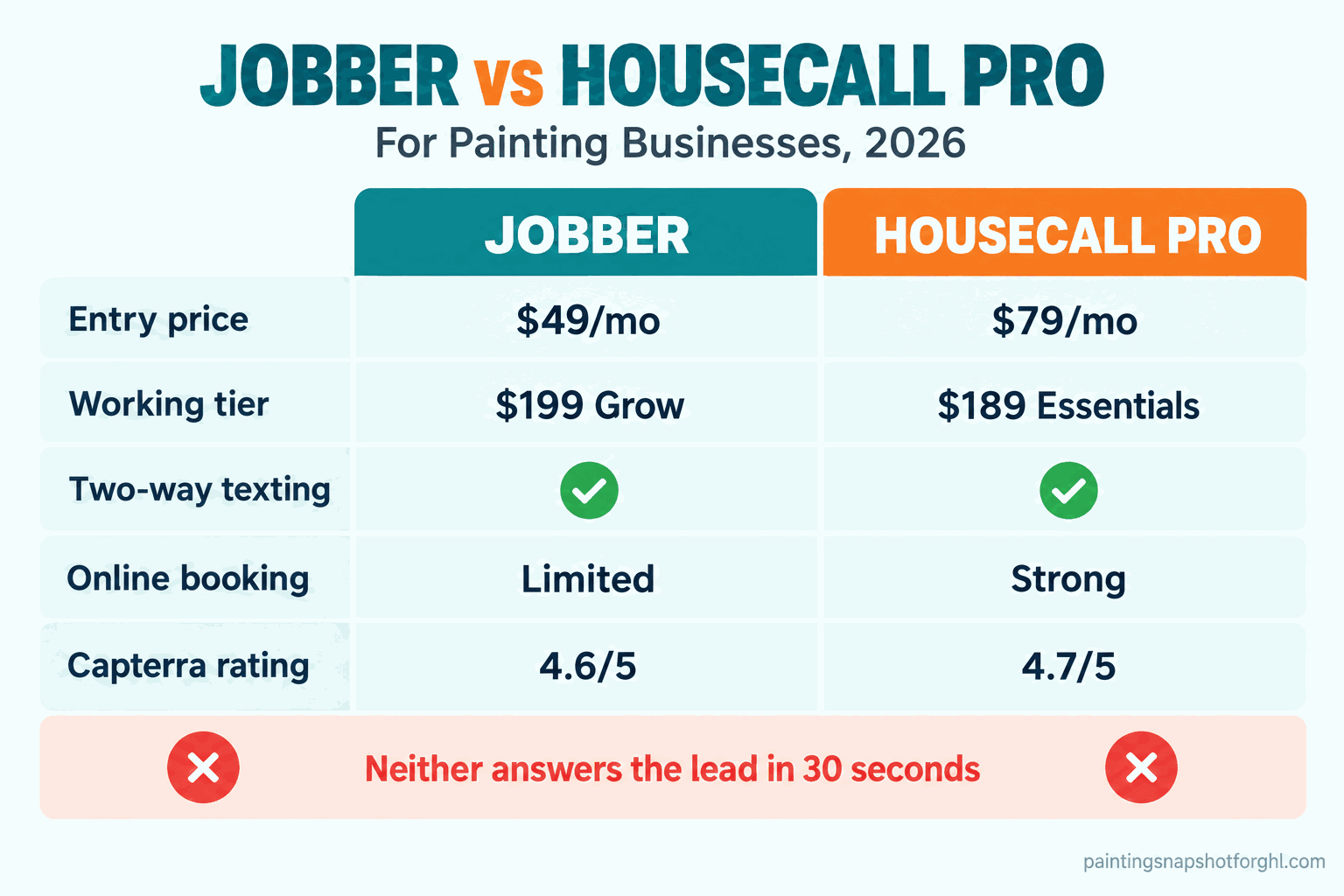
At every comparable tier, Housecall Pro costs more. Whether that gap buys you anything depends on the eight things below.
The eight criteria that matter to a painter
1. Price and what each tier really includes
The feature you need usually lives one tier up from where you want to pay. On Jobber, two-way texting and job costing are on Grow ($199), not Core. On Housecall Pro, QuickBooks sync is on Essentials ($189), not Basic. So the honest comparison is not $49 vs $79. For a crew that texts customers and syncs its books, it is $199 Grow vs $189 Essentials, nearly even.
How it breaks: you sign up for the cheap tier, then hit the wall where a feature you assumed was included is gated. Read the tier a feature lives on before you pick the sticker.
2. Quoting and estimates
A painter’s money moment. Both do line-item quotes, good-better-best options, and photos on the estimate. On Jobber Grow you can add optional line items the customer checks to upsell themselves (an accent wall, a second coat, trim). Housecall Pro’s estimates look sharp and tie into its online-booking flow and flat-rate price book.
How it breaks: neither one quotes for you. If the quote still waits until you are home from the ladder at 8pm, the tool did not fix your real problem.
3. Scheduling and dispatch around a crew and the weather
Both handle a calendar, crew assignment, and drag-to-reschedule. Jobber has route optimization built in, handy if your painters bounce between three sites a day. Housecall Pro’s dispatch and its “your painter is on the way” notification feel more polished to the homeowner.
How it breaks: rain. Exterior season lives and dies on the forecast, and neither tool reschedules a washed-out Thursday for you.
4. Answering the lead and two-way texting
The one that decides revenue. Jobber puts two-way SMS on Grow. Housecall Pro includes texting and adds online booking so a homeowner can grab a slot without calling.
How it breaks, and this is the big one: both text the customer after you are already talking. Neither answers the lead that lands while you are up a ladder or asleep. The missed call at 7:10pm goes to voicemail, and that homeowner calls the next painter. Winning that moment is a separate system, and the most expensive gap in either stack.
5. Payments, deposits, and invoicing
Both take cards and ACH in-app and send automated invoices. Jobber Payments runs about 2.9% plus $0.30 per card; Housecall Pro is in the same ballpark. Both let you require a deposit before the crew rolls, the feature that protects your cash in painting.
How it breaks: if deposit collection is a manual step the office forgets, you start jobs unpaid. Make the automatic deposit request a hard gate before any crew is scheduled.
6. Reviews and reputation
Reviews are how the next homeowner picks you. Housecall Pro bundles review management into Essentials and up, prompting for a Google review automatically. Jobber has review requests too, though its reputation tooling is lighter and often where painters add a third app.
How it breaks: a review ask that goes out three weeks late gets ignored. It has to fire the day the job wraps, while the homeowner is still happy.
7. Integrations and the CompanyCam photo layer
Both sync with QuickBooks (Jobber on Connect+, Housecall Pro on Essentials+) and connect to Zapier for the rest. The integration that matters most in painting is photo documentation. CompanyCam is the before-and-after app most painters already run alongside either CRM, and it works with both, starting around $79/mo for one user and $149/mo for a small crew (PricingSaaS). Budget for it.
How it breaks: if photos live on three painters’ phones and never make the job record, your warranty defense and your marketing both suffer. Pick one photo system and make the crew use it.
8. Migration, data export, and support
Getting in is easy. Getting your data back out is the part nobody checks until they want to leave. Both import customers from a spreadsheet and offer email and chat support, with phone and dedicated onboarding on the top tiers (Jobber Plus, Housecall MAX). On Capterra, Jobber sits around 4.6/5 and Housecall Pro around 4.7/5.
How it breaks: you build two years of job history inside one tool, then find exporting it cleanly is a project. Ask each vendor in writing exactly how you get your data out before you commit.
Side by side: the full comparison table
| Criterion | Jobber | Housecall Pro |
|---|---|---|
| Entry price (month-to-month) | ~$49/mo Core | ~$79/mo Basic |
| Working-tier price (texting + QB sync) | ~$199/mo Grow | ~$189/mo Essentials |
| Two-way texting | Grow tier | Included |
| Online booking for homeowners | Limited | Strong, built in |
| Quoting and upsell line items | Strong (Grow) | Strong, polished PDF |
| Job costing | Grow tier | MAX tier |
| QuickBooks sync | Connect+ | Essentials+ |
| Review automation | Lighter | Built in (Essentials+) |
| Route optimization | Built in | Add-on feel |
| Reporting depth | Stronger | Good |
| Consumer experience | Functional | More polished |
| Capterra rating | ~4.6/5 | ~4.7/5 |
| Answers a brand-new lead in seconds | No | No |
| Chases an unsold estimate for 14 days | No | No |
The bottom two rows are the point. Everything above them is a close call you make on budget and feel. On those two, both tools lose, and that gap is where the money is.
Three real scenarios: solo, five-person crew, big shop
The right answer changes with the size of the shop.
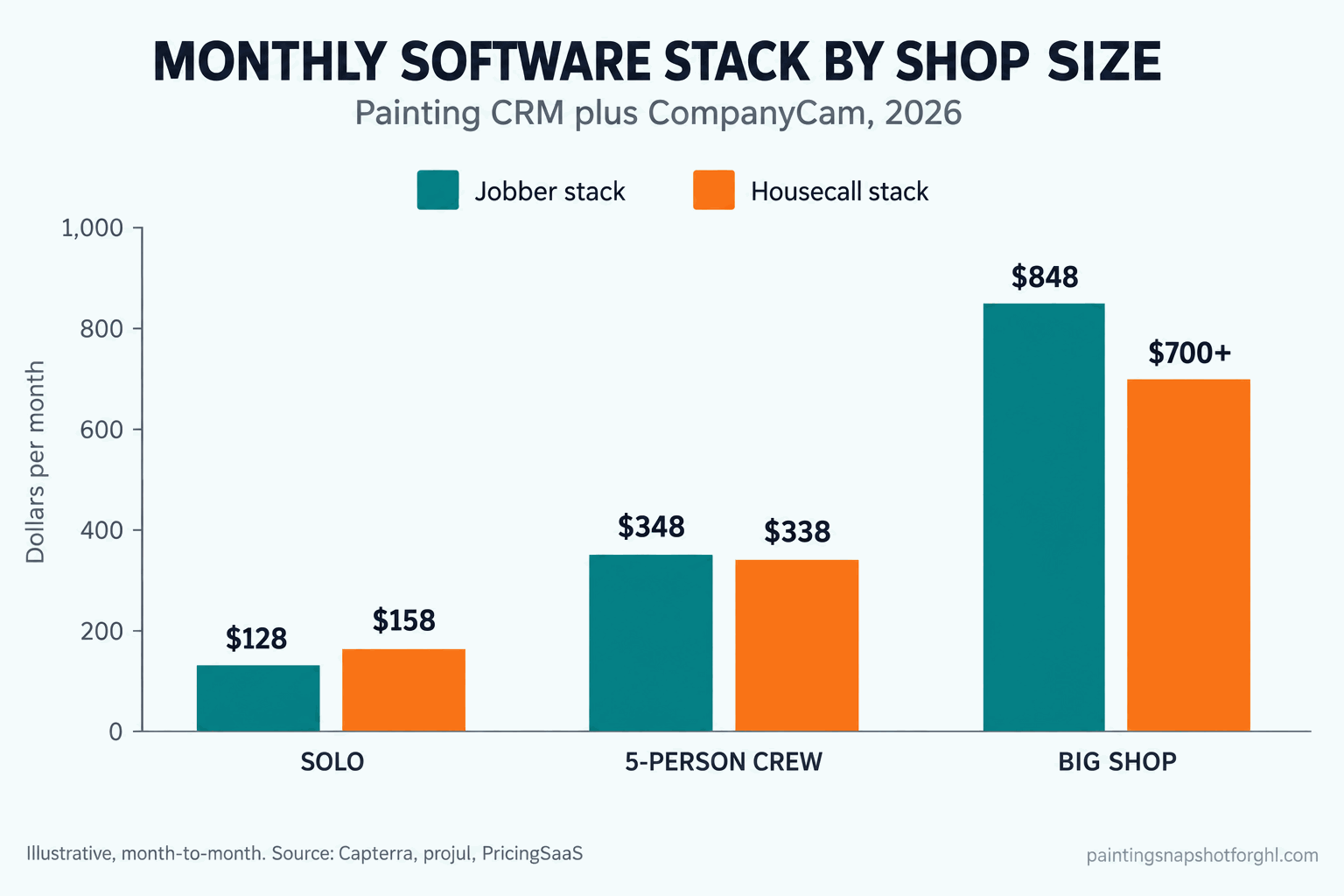
The solo painter. One truck, you quote and paint and invoice yourself. Jobber Core (~$49/mo) is the lean pick; Housecall Pro Basic (~$79/mo) is defensible if you want online booking. The real risk is not the $30 difference. It is that at a one-person shop, every lead that lands while you are painting goes unanswered, so lead response matters most here.
The five-person crew. You text customers and sync QuickBooks, so you shop the working tier, not the sticker. Jobber Grow (~$199/mo) vs Housecall Pro Essentials (~$189/mo) is a coin flip on price. Decide on feel: Jobber for reporting and job costing, Housecall Pro for the homeowner experience and bundled reviews. Add CompanyCam Crew (~$149/mo) and your true stack is roughly $340 to $350 either way.
The big multi-crew shop. Ten-plus painters, commercial or HOA work, estimators in reporting all day. That pushes you to Jobber Plus (~$699/mo) or Housecall Pro MAX (~$329/mo plus ~$35 per seat over eight). Pricing converges here, so the call is which reporting and dispatch model fits how you run. Across the three sizes, the software stack (CRM plus CompanyCam) runs roughly $128 to $158 solo, $340 to $350 for a five-person crew, and $850-plus for a big shop.
For a deeper cost breakdown across all five tools painters shop, see our best painting business software guide for 2026.
The job neither one does (and the copy to steal)
Neither tool answers the homeowner who fills out your form at 9pm or calls while your crew is spraying a ceiling. Lead response is a different category that runs in front of the CRM, and it is where the money is (that seven-times number from the HBR study). The painter who texts back in 30 seconds books the job; the one who calls tomorrow quotes a homeowner who already hired someone else. Here is the copy to steal, the messages that should fire on their own.
The instant missed-call text (fires within 30 seconds of a missed call):
Hi, this is [Name] with [Company]. Sorry I missed you, I’m with a crew right now. Are you looking for an interior or exterior painting estimate? I can text you a few times that work today.
The after-hours web-lead reply (fires instantly on a form submit):
Thanks for reaching out to [Company]! I got your request for a [project] estimate. What’s the best day this week for a quick 15-minute walkthrough, Thursday or Friday?
The unsold-estimate follow-up (a 14-day sequence, not one text):
Day 2: Hi [Name], did you get a chance to look over the estimate for your [project]? Happy to walk through any of it. Day 5: Just checking in on the painting quote. We have an opening the week of [date] if the timing works. Day 10: Still want to make this happen for you. Is price, timing, or color holding things up? I can help with any of them. Day 14: Last check-in. If now isn’t the right time, no problem. I’ll keep your color notes on file for when you’re ready.
The review request (fires the day the job is marked complete):
Hi [Name], the crew loved working on your home! If you have 30 seconds, a quick Google review helps us a ton: [link]. Thank you!
The CRM files the job; the response layer wins it.
Compliance a painting shop can’t skip
Three rules shape what you are allowed to do. Neither tool enforces them for you.
EPA lead-paint RRP. If you disturb paint in a home built before 1978, federal Renovation, Repair and Painting rules require your firm to be certified and to work lead-safe. The EPA notes roughly three-quarters of pre-1978 US homes still contain some lead-based paint, so on older houses this is not optional.
Advertising the license number. Some states are strict. California requires the license number in all advertising under Business and Professions Code 7030.5, including your website and vehicle wraps. If your templated site does not show it, that is a website fix.
TCPA and A2P 10DLC on texting. Every text in those scripts is regulated. The TCPA requires prior express consent for marketing texts, and US carriers require A2P 10DLC registration or your messages get filtered. Keep a clear opt-in and an easy STOP, and register your number. Full rundown in our compliance checklist for 2026.
Straight answers to the objections
“I already pay for Jobber. Do I have to switch to get the follow-up?” No, and that is the point. The lead-response layer runs in front of whatever CRM you use. Keep Jobber or Housecall Pro for booked work and add the system that answers the lead and chases the estimate on top. See GoHighLevel vs Jobber for painters.
“Won’t the automated texts annoy customers?” Not when they are fast, relevant, and easy to stop. A homeowner who just asked for a quote is glad to hear back in 30 seconds. What annoys people is silence for two days. The missed-call text-back approach feels like good service, because it is.
“Do I need to be technical to run this?” No. If you can use a smartphone, you can run either CRM, and a done-for-you response layer is set up for you, not by you.
“Is Housecall Pro worth the extra money?” For some shops, yes. If a polished homeowner experience and bundled reviews fit how you sell, the gap is small and worth it. For a cost-focused solo or small crew that lives in reporting, Jobber usually wins on value. Compare the whole field in our best painting business software guide.
“What about JobNimbus or PaintScout?” Different tools for different jobs; we break down what JobNimbus actually costs separately. For this decision, Jobber and Housecall Pro are the two most painters actually choose between.
Frequently asked questions
Is Jobber or Housecall Pro cheaper for a painting business in 2026?
Jobber is cheaper at entry, around $49/mo for Core vs about $79/mo for Housecall Pro Basic. The gap narrows at the working tier most crews need: Jobber Grow (~$199/mo, adds texting and job costing) vs Housecall Pro Essentials (~$189/mo, adds QuickBooks). Annual billing lowers both by roughly a quarter to a third. Prices are from third-party trackers, so confirm on each vendor's site.
Which is better for a small painting crew?
For a cost-focused crew that wants reporting and job costing, Jobber tends to win on value. For a crew that sells on polish and wants a smooth homeowner booking-and-payment experience plus bundled reviews, Housecall Pro is worth the small premium. Both handle quoting, scheduling, dispatch, and payments well.
Does Jobber or Housecall Pro answer leads automatically?
No. Both manage work you have already booked and text a customer you are already talking to. Neither answers a brand-new lead in the first minute or runs a multi-week chase on an unsold estimate. That is lead-response automation, a separate layer in front of the CRM, and where most painting revenue leaks.
Do I need CompanyCam if I use Jobber or Housecall Pro?
Most painters run CompanyCam alongside either CRM for before-and-after photos, which protects warranty defense and feeds marketing. It integrates with both and starts around $79/mo for one user and about $149/mo for a small crew in 2026. Budget for it as part of the real stack.
Can I switch between them without losing my data?
Both import customers from a spreadsheet, so getting in is easy. A clean export of job history, notes, and photos is the part to check first. Before you commit, ask each vendor in writing exactly how you retrieve your data if you ever leave. On Capterra, both are well-liked: Jobber around 4.6/5, Housecall Pro around 4.7/5.